Precise when you need it.
Turn the wheel slowly for the usual fine control. Flick it quickly to scroll farther, with acceleration you can adjust to your liking.
 Velvet Scroll
A little comfort for your desktop
Keep the little movements precise.
Let the big flicks take you
further.
Mouse-wheel acceleration for Linux, with a gentle touch and one easy toggle. Small enough to stay out of your way.
Free & open source Made for Linux
Thoughtful little details
For long pages, sprawling projects and those moments when one more wheel turn becomes twenty.
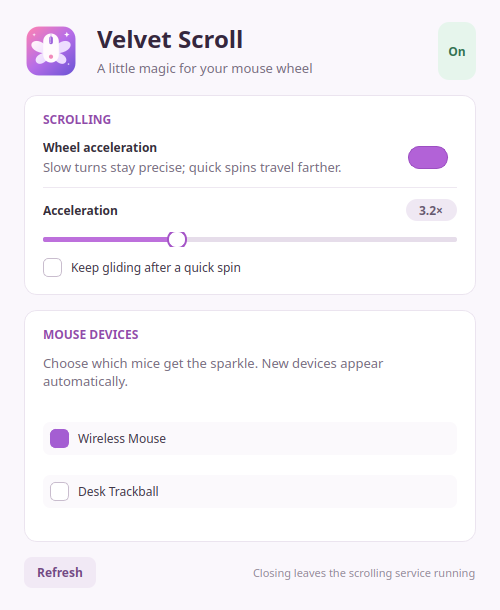
Turn the wheel slowly for the usual fine control. Flick it quickly to scroll farther, with acceleration you can adjust to your liking.
Optional coasting adds a short tail after a fast flick. It starts off, so you can settle into the feel before trying it.
Toggle from the tray, the settings window or a keyboard shortcut. Select your mice individually. Close the window and keep scrolling.
A smoother journey for your wheel.
The familiar feel of your pointer.
Wheel scrolling changes; pointer movement and mouse calibration are preserved.
Make yourself comfortable
Pick the package that fits your Linux desktop. Velvet Scroll is free, open source, and yours to make at home.
All releases & checksumsPackages are available on GitHub Releases.
sudo apt install ./velvet-scroll_*.debUse one downloaded package matching your architecture. Builds require glibc 2.39 or newer.
Finish setup: device permissions & first launchBefore you settle in
Velvet Scroll works through Linux evdev and uinput, below the desktop. It is designed for KDE Plasma, GNOME and other desktops on Wayland or X11. Linux device access and an active-seat permission setup are required. Hardware and desktop testing is ongoing; see the compatibility notes.
Only wheel values are accelerated. The virtual mouse preserves the physical mouse's identity, calibration, pointer deltas and event timing so your usual pointer settings remain in effect.
It brings some of that convenience to a regular wheel: a quick flick travels farther, and optional coasting adds a short glide. It is a software approximation, not a physical free-spinning wheel. Animation and smoothness still depend on the application.
Yes. Use the tray toggle or bind
velvet-scroll toggle to a desktop keyboard shortcut.
You can also disable it in the settings window. No mouse is
selected automatically.
No. The daemon and GUI run as your desktop user. Installing the package and setting up device permissions requires administrator access once. Follow the installation guide, then launch Velvet Scroll without sudo.
Try it with your setup, report a bug, or contribute a change. Include your distro, desktop/session type and mouse model. Redact device serial numbers and personal paths from any diagnostic output.